 Peri HepB 1.17.11 User Guide
 |
|
| Peri HepB 1.17.11 User Guide |
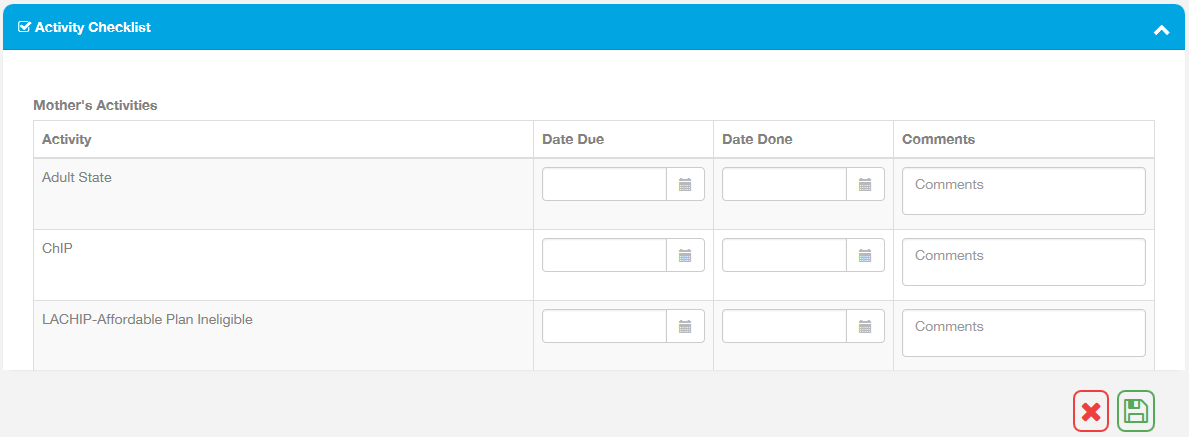
With the Activity Tracker, users can keep track of an activity checklist for each case. The activity checklist is defined by the state and lists activities that the state would like to have tracked.
After creating and saving a Mother case, the Add Activity Tracker icon
( ) appears in the Mother's Gestational
History section of the Mother's Case Detail page. Click the icon to add
an Activity Tracker. The page changes to show the Mother Detail section
at the top of the page and the Activity Checklist section underneath.
) appears in the Mother's Gestational
History section of the Mother's Case Detail page. Click the icon to add
an Activity Tracker. The page changes to show the Mother Detail section
at the top of the page and the Activity Checklist section underneath.
Activities are listed individually under the Mother's Activities heading.
For each activity, enter a due date and any comments. When finished, click
the Save Page icon ( ). As each activity is completed,
return to edit the Mother's case and enter the activity completion date
in the Date Done column. Again, click the Save Page icon when finished.
). As each activity is completed,
return to edit the Mother's case and enter the activity completion date
in the Date Done column. Again, click the Save Page icon when finished.
Example Activity Checklist: