 SMaRT AFIX
User Guide (v. March 2018)
SMaRT AFIX
User Guide (v. March 2018)|
|
| SMaRT AFIX
User Guide (v. March 2018) |
To log out of the application, click on the user image icon located on the far right side of the header bar, then click on the Log out link that appears.
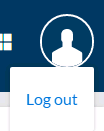
| NOTE: Users may see additional links here such as Manage Users or Manage Provider Groups. See Manage Users and Manage Provider Groups for more information. |